# Controller Overview

<figure><img src="/files/iavw4ncu1e2OZij91ZAV" alt=""><figcaption></figcaption></figure>

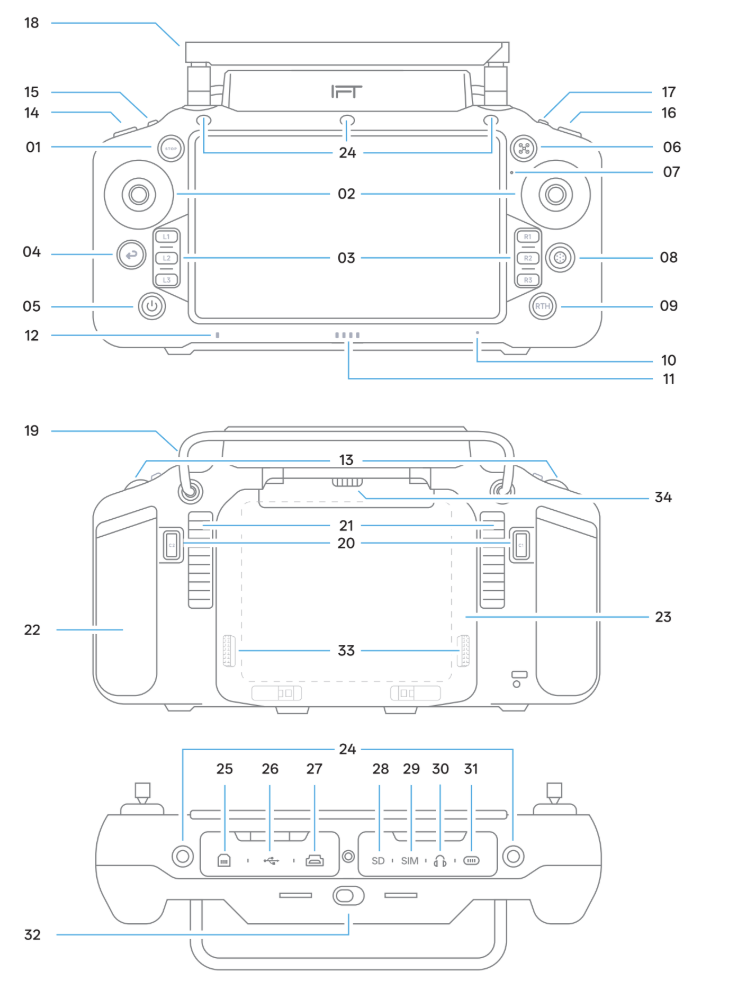
<table><thead><tr><th width="106">Name</th><th>Function</th><th>Remarks</th></tr></thead><tbody><tr><td>2</td><td>Joystick</td><td>Controls drone movement</td></tr><tr><td>3</td><td>Custom Button</td><td>User-defined function</td></tr><tr><td>4</td><td>Back Button</td><td>Return function</td></tr><tr><td>5</td><td>Power Button</td><td>Power on/off, battery check, restart</td></tr><tr><td>6</td><td>Hover Button</td><td>Makes drone hover</td></tr><tr><td>7</td><td>Buzzer</td><td>Emits warning sound</td></tr><tr><td>8</td><td>Five-Way Button</td><td>Directional Control</td></tr><tr><td>9</td><td>RTH Button</td><td>Return-to-Home</td></tr><tr><td>10</td><td>Microphone</td><td>Sound recording</td></tr><tr><td>11</td><td>Battery-LED</td><td>Shows battery status</td></tr><tr><td>12</td><td>Connection Status LED</td><td>Shows connection status </td></tr><tr><td>13</td><td>Scroll Wheel</td><td>Gimbal control</td></tr><tr><td>14</td><td>Pause/Play</td><td>Video control</td></tr><tr><td>15</td><td>Flight Mode Switch</td><td>Switch flight modes</td></tr><tr><td>16</td><td>Photo Button</td><td>Camera control</td></tr><tr><td>17</td><td>3-Position Switch</td><td>User-defined function</td></tr><tr><td>18</td><td>Antenna</td><td>Signal transmission</td></tr><tr><td>19</td><td>Handle</td><td>Device holding</td></tr><tr><td>20</td><td>Custom Buttons (C1/C2)</td><td>User-defined function</td></tr><tr><td>21</td><td>Cooling Vents</td><td>Heat dissipation</td></tr><tr><td>22</td><td>Silicone Grip</td><td>Grip handle</td></tr><tr><td>23</td><td>Battery Compartment Cover</td><td>Battery installation</td></tr><tr><td>24</td><td>Mounting Hole</td><td>Attach accessories</td></tr><tr><td>25</td><td>JF-45 Port</td><td>Wired network connection</td></tr><tr><td>26</td><td>USB Type-A Slot</td><td>Connect USB devices</td></tr><tr><td>27</td><td>HDMI Port</td><td>Video output</td></tr><tr><td>28</td><td>microSD Card Slot</td><td>Install memory card</td></tr><tr><td>29</td><td>SIM Card Slot</td><td>Install SIM card</td></tr><tr><td>30</td><td>Headphone Jack</td><td>Connect headphones</td></tr><tr><td>31</td><td>USB Type-C</td><td>Device Charging</td></tr><tr><td>32</td><td>Battery Slide-Lock</td><td>Lock/unlock battery</td></tr><tr><td>33</td><td>Battery Release Buttons</td><td>Remove battery</td></tr><tr><td>34</td><td>Speaker</td><td>Output Sound</td></tr></tbody></table>


---

# Agent Instructions: Querying This Documentation

If you need additional information that is not directly available in this page, you can query the documentation dynamically by asking a question.

Perform an HTTP GET request on the current page URL with the `ask` query parameter:

```
GET https://docs.inspiredflight.com/inspired-documentation/products/ground-control-stations/gs-one/controller-overview.md?ask=<question>
```

The question should be specific, self-contained, and written in natural language.
The response will contain a direct answer to the question and relevant excerpts and sources from the documentation.

Use this mechanism when the answer is not explicitly present in the current page, you need clarification or additional context, or you want to retrieve related documentation sections.
